Cyphal Upgrade (DFU)
The Cyphal device firmware update (DFU) work as following:
- A server must provide a file server to be able to serve the new image file
- A DFU command (including file name) is send to a node (ExecuteCommand)
- The node responses with command success
- The node switches its operation mode to UpdateState
- The node uses file request to download the new image in chunks via cyphal (file name). It is stored in the second partition of the flash
- Upon receiving the last chunk, the node restarts
- MCUBoot will copy the new image to the primary partition after it got verified
Helpful commands for Yakut
Yakut, a command-line interface (CLI), enables firmware upgrades on the BMS board over the Cyphal bus.
File-Server:
yakut file-server
The DFU command:
yakut cmd <id> begin_software_update "com.starcopter.highdra.bms-4.1-0.9.37dcb342c2a3b602.739572c6f32fe387.app.bin"
All at once:
yakut file-server --plug-and-play=allocation_table.db --update-software
Firmware upgrade over cyphal
Step 1: Install Yakut
Make sure yakut is already installed on your system. If not, run pip install yakut.
Step 2: Connect to Sirius
Run ssh sirius from your command line or terminal to connect to the remote machine.
Step 3: Adding DSDL namespaces
To compile and use dsdl namespaces in Yakut, run the following commands:
mkdir -p ~/.cyphal # Ensure the directory actually exists.
# Add all namespaces from the public regulated data types repository:
wget https://github.com/OpenCyphal/public_regulated_data_types/archive/refs/heads/master.zip -O dsdl.zip
unzip dsdl.zip -d ~/.cyphal
mv -f ~/.cyphal/public_regulated_data_types*/* ~/.cyphal
Step 4: Set environment variables
- Set
CYPHAL_PATHin Bash/Zsh (if not already set). Cyphal automatically looks for DSDL namespaces in the directories listed in theCYPHAL_PATHenvironment variable.
export CYPHAL_PATH="$HOME/.cyphal:$CYPHAL_PATH"
or you can also copy the above line in the ~/.bashrc file to set environment variable
permanently.
- Set CAN interface (
can 0orcan 1), maximum transmission unit (64 for FDCAN), and accommodate node id.
export UAVCAN__CAN__IFACE=socketcan:can1 UAVCAN__CAN__MTU=64 export UAVCAN__NODE__ID=$(yakut accommodate)
e.g., statically allocate node id
export UAVCAN__CAN__IFACE=socketcan:can1 UAVCAN__CAN__MTU=64 export UAVCAN__NODE__ID=72
or you can also copy the above lines in the ~/.bashrc file to set environment variable
permanently.
Step 5: Network activity
The command yakut monitor can be used to display all activity on the network in a compact
representation. It tracks online nodes and maintains real-time statistics on all transfers exchanged
between each node on the network. It may also be able to detect some common network configuration
issues like zombie nodes (nodes that do not publish uavcan.node.Heartbeat).
Read yakut monitor --help for details.
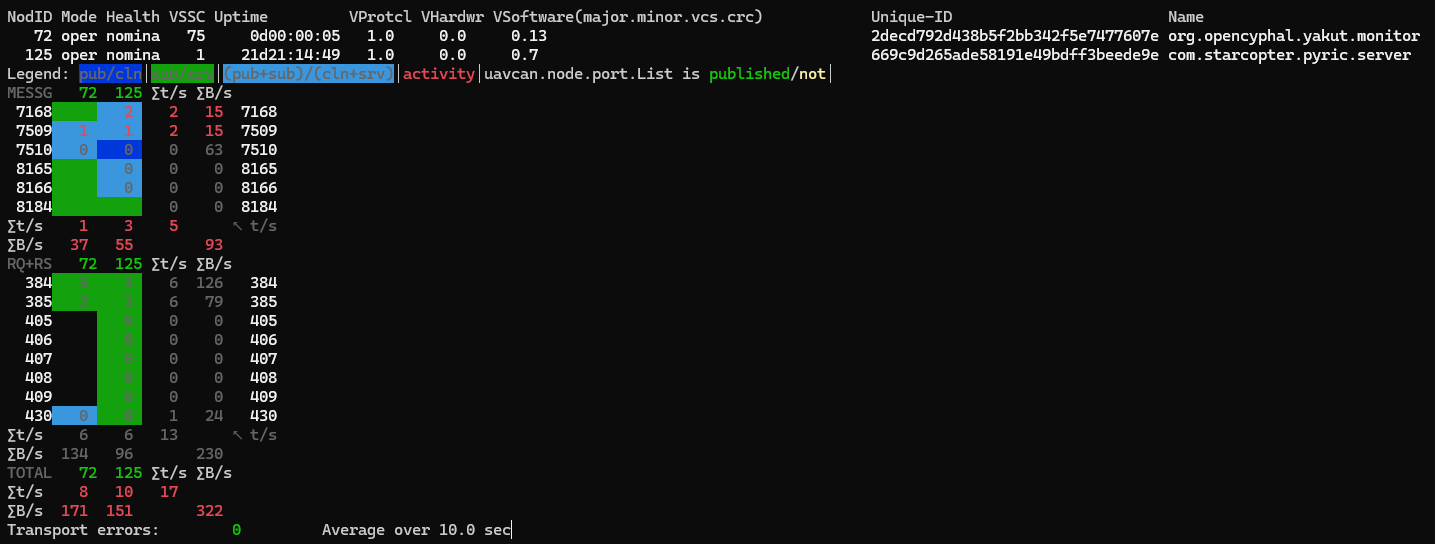
Press CTRL + C to stop yakut monitor.
Step 6: Run yakut file server
yakut --verbose file-server
Read yakut file-server --help for details.
Step 7: Download binary file
Download assets from the release page. Locate
bin file and place in the $HOME/ directory on the host (sirius) machine or inside some folder
(e.g., $HOME/build/).
Step 8: Begin software update
Open new bash terminal, connect to sirius (ssh sirius), repeat
step 4(2) and allocate the same node ID as previously.
Run the following command to begin software update. The device will start downloading the firmware in the secondary partition. The device gets rebooted after the firmware has downloaded. Before swapping the image, the MCUBoot checks the integrity of the image by comparing the stored hash in the image's TLV with the calculated one. If the hash matches, the MCUBoot proceeds with the swap operation otherwise executes the primary image.
yakut cmd <node_id> begin_software_update <image_path>
# e.g.,
yakut cmd 72 begin_software_update assets/app-bms-hvD.1-v0.7.0.bin
If you have already minicom terminal opened, you will see the following logs.
minicom -D /dev/ttyACM0
[00:00:54.012,000] <inf> cyphal_application_layer: sending heartbeat: uptime=54, health=0, mode=0, VSSC=0x00
[00:00:54.277,000] <inf> cyphal_application_layer: Command 65533 (request 0 from 72) handled with status 0
[00:00:54.277,000] <inf> cyphal_application_layer: DFU thread started!
[00:00:54.278,000] <inf> cyphal_application_layer: Loading image from path assets/app-bms-hvD.1-v0.7.0.bin from remote file server node id 72
[00:00:55.025,000] <inf> cyphal_application_layer: sending heartbeat: uptime=55, health=0, mode=3, VSSC=0x00
[00:00:56.025,000] <inf> cyphal_application_layer: sending heartbeat: uptime=56, health=0, mode=3, VSSC=0x00
[00:00:57.025,000] <inf> cyphal_application_layer: sending heartbeat: uptime=57, health=0, mode=3, VSSC=0x00
[00:00:57.519,000] <inf> cyphal_application_layer: 80744 bytes downloaded successfully in 3241 ms
[00:00:57.519,000] <inf> cyphal_application_layer: Exit DFU!
[00:00:57.519,000] <inf> cyphal_application_layer: Restarting node!
*** Booting MCUboot c6fca426a265 ***
*** Using Zephyr OS build v3.6.0+starcopter-01 ***
I: Starting bootloader
I: Primary image: magic=good, swap_type=0x4, copy_done=0x1, image_ok=0x1
I: Secondary image: magic=good, swap_type=0x2, copy_done=0x3, image_ok=0x3
I: Boot source: none
I: Image index: 0, Swap type: test
I: Starting swap using move algorithm.
I: Bootloader chainload address offset: 0x8000
I: Image version: v0.7.0
I: Jumping to the first image slot
*** Booting Zephyr OS build v3.6.0+starcopter-01 ***
[00:00:00.007,000] <inf> cyphal_transport_layer: CAN Controller initialized!
[00:00:00.007,000] <inf> cyphal_application_layer: sending heartbeat: uptime=0, health=0, mode=0, VSSC=0x00